Start at the wall
Select the wall outlet, circuit or GPO reference, then connect its supply to the installed UPS.
RACK POWER & SWITCH EXPANSION
Build the front and rear rack first, record the power chain from incoming supply to each device, then configure the SFP ports physically fitted to the switches.
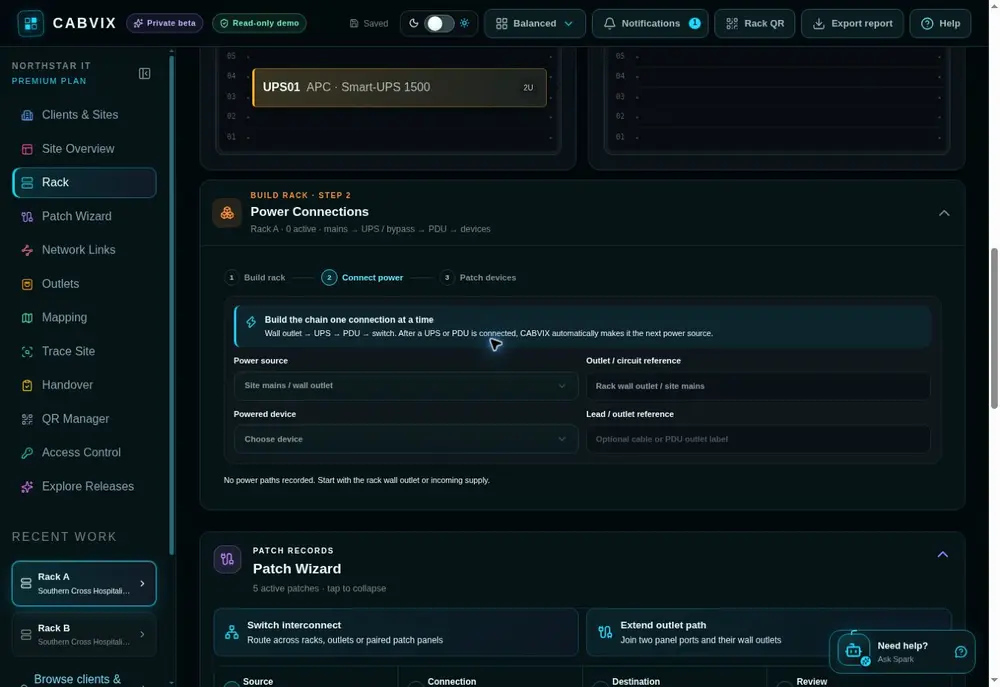
CABVIX guides the physical rack power chain one connection at a time—wall outlet → UPS → PDU or power rail → switch or device—then tracks the individual source outputs already in use.
POWER CONNECTIONS
Select the wall outlet, circuit or GPO reference, then connect its supply to the installed UPS.
After a UPS or PDU is connected, CABVIX selects it as the next source so the chain can continue without rebuilding context.
Select the individual UPS or PDU output serving each switch or device. Used outputs remain accounted for in the rack record.
FITTED SWITCH PORTS
Use Manage SFP ports below the switch port grid and enter the additional ports physically available.
Set Fibre transceiver, Direct attach copper (DAC), RJ45 copper adapter or Reserved for every fitted port.
Fibre and DAC ports belong in Network Links. RJ45-adapted ports are also available for copper patching in Patch Wizard.
Disconnect an in-use SFP path before changing its mode or removing the fitted port from the record.
HARDWARE THAT MATCHES THE RACK
Review the balanced front and rear elevations, device power source and available network ports before a physical change.
Add the included horizontal power rail when the exact installed model is not part of the hardware catalogue.
Choose Switch, Patch panel, Gateway, UPS, PDU, Power, Fibre or another type to reveal the fields relevant to that equipment.
COMMON QUESTIONS
Wall outlets, UPS units, bypass equipment, PDUs or power rails and the powered rack devices they serve.
Connect one step at a time. After a UPS or PDU is connected, CABVIX makes it the next source and lets you choose the individual output used downstream.
Yes. Create unlisted device uses type-aware fields for switches, patch panels, gateways, UPS units, PDUs, power equipment, fibre hardware and other rack items.
No. CABVIX documents the recorded physical path and references. Electrical design, installation, testing and certification remain professional obligations.
Fibre transceiver, Direct attach copper (DAC), RJ45 copper adapter and Reserved.
Yes. Power connections are a selectable section in CABVIX rack and multi-rack site reports.
BUILD · POWER · PATCH